
Feature Rundown
Everything Wizbook can do, explained.
Camera Scanning
Point your camera at a physical card and Wizbook reads it. Names are identified correctly 97.6% of the time, measured on real photographs of real cards.
- Finds the card itself. Anywhere in the frame, at any angle, on a desk, a playmat or a carpet; an outline tracks the card as you move it
- Runs on your device. The text recognition and the artwork matching both happen in your browser, so there is no quota, no queue, and no camera image leaves your device
- Knows the artwork. A fingerprint of every printing's art, built from 45,691 card images, which is usually what tells two printings of the same card apart
- Reads sharp frames, not still ones. You do not have to hold the card still, only steady enough that it is not blurred
- Says how sure it is. Confident reads join the queue, uncertain ones show you the printings it is choosing between, poor ones keep looking
- Scans playsets. Four copies of the same card in a row give you four
- Review without stopping. See everything scanned so far with art, remove a mistake or change a printing, then carry on
- Set Lock. Opening a box of one set, lock the scanner to it for faster and more accurate reads
- Both faces and flavour names. Transforming cards are indexed on both faces, and cards printed with a flavour name match on the name actually on them
Card Search
Search the entire Magic: The Gathering card database instantly. Over 70,000 cards indexed from Scryfall.
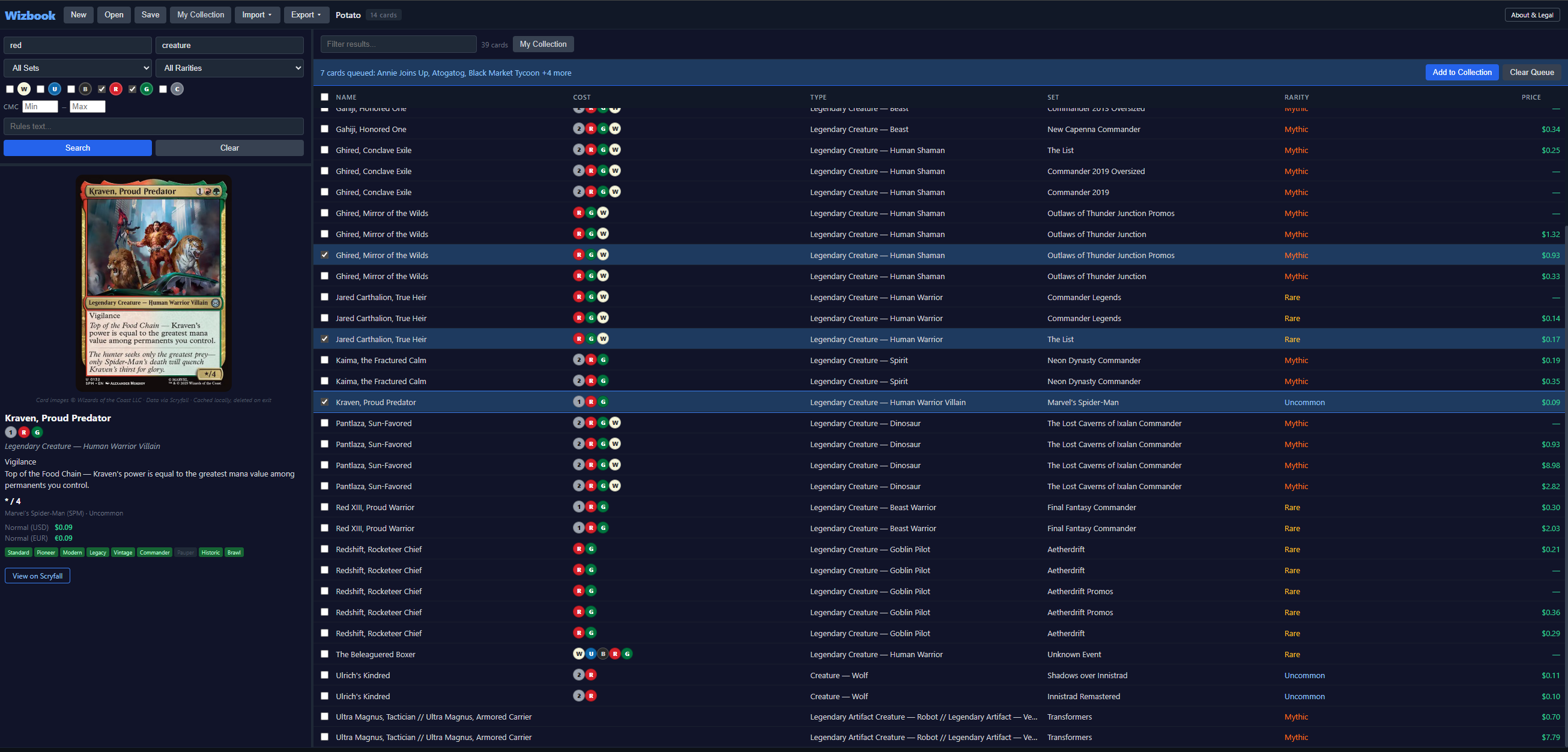
- Name & type. Search by card name or type line
- Set & rarity. Filter by any set or rarity
- Color identity. Filter by one or more colors (W, U, B, R, G, C). Switch between Includes (W also finds Orzhov) and Exactly (W finds mono-white only)
- Mana value (CMC). Filter by min/max converted mana cost
- Power & toughness. Filter creatures by power and toughness ranges
- Price range. Filter by USD price range
- Rules text. Search within oracle text for keywords and abilities
- Parametric syntax. Type Scryfall-style queries directly in the Name field:
t:creature c:red cmc>=3,kw:flying usd<1,f:commander is:foil. Supportst:,o:,ft:,c:,r:,e:,f:,kw:,artist:,usd:,cmc:,pow:,tou:with comparison operators andis:foil/is:nonfoil/is:promo. For colors,c:wmeans includes white whilec=worc!wmeans exactly white - Name matching. A plain search matches the start of any word, so
ratfinds Pack Rat and Ratchet Bomb but not Pirate. Wrap it in stars,*rat*, to match anywhere in the name, which is how*goyf*finds Tarmogoyf. If a plain search finds nothing, Wizbook widens it for you and says so. - Instant results. All searching happens locally, results appear in milliseconds
View Modes
Switch between different ways to view your cards.
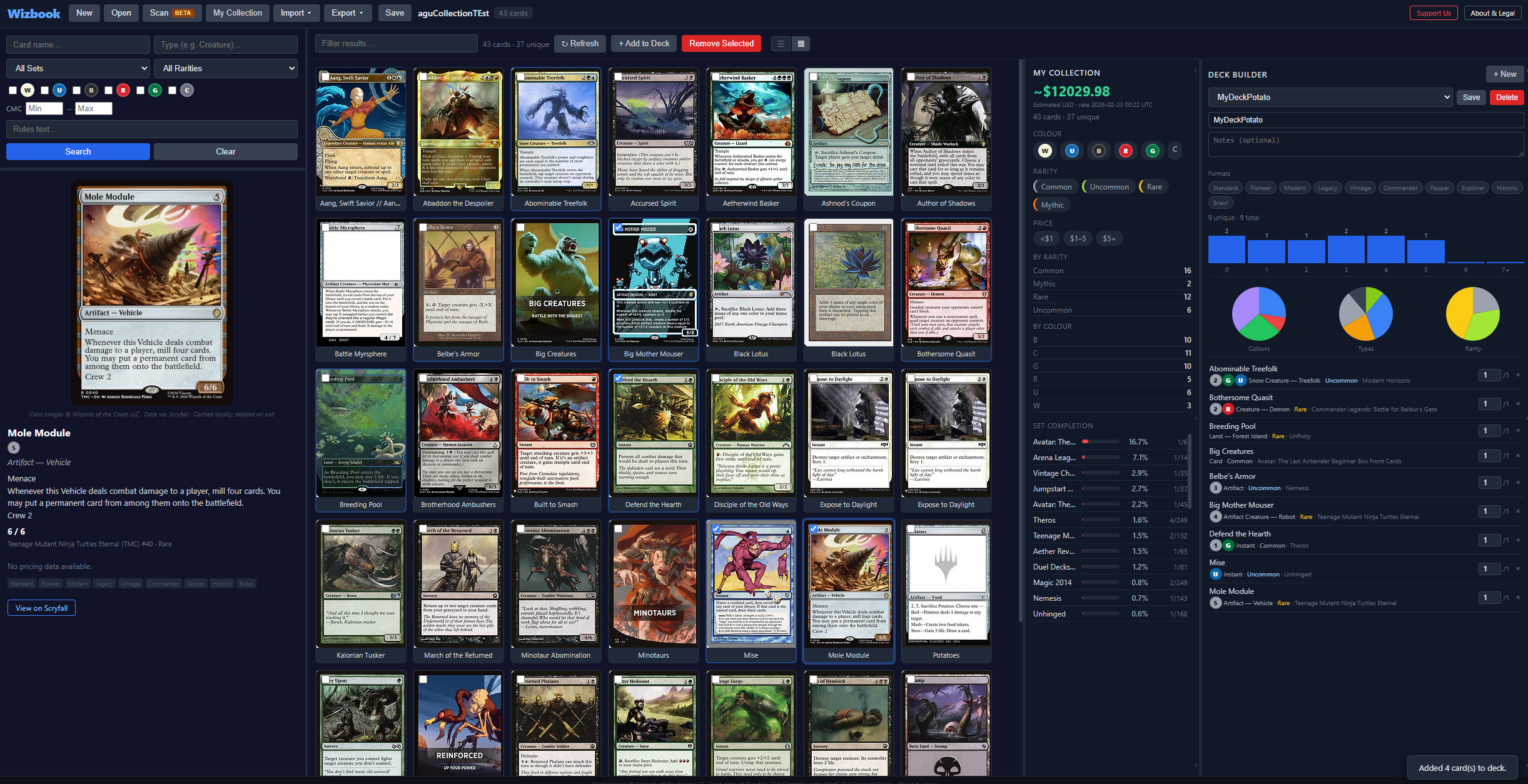
- List view. Sortable table with resizable, reorderable columns (Deck and Binder columns sortable too)
- Grid view. Card images in a responsive grid, with a Scale slider that loads higher-res art above 200 px, a SET overlay, a $ price overlay (EUR-first for EU/UK regions), and a release-date sort button
- Holographic foil effect. Foil and etched printings shimmer in grid view with a rainbow gradient that follows your cursor; etched gets a distinct silvery metallic look. A matching toggle on the card viewer lets you flip the effect on and off
- All Versions. In the card viewer, one click shows every printing of the current card, sorted newest first; a back button restores your previous search results intact
- Double-faced flip. Pathways, Werewolves, Delver and any other DFC / transform / MDFC card gets a flip button in both the card viewer (top-right of the image) and the grid (top-left of the tile) to swap to the back face
- Windowed pagination. Numbered page buttons with First / Last arrows so you can jump directly to any page instead of clicking Next dozens of times
- Column settings. Choose which data columns appear, including optional Released and Artist columns; reset widths with one click
- Artist filter. Advanced Filters includes an Artist substring match that works in both search and collection
- Multi-select Set & Rarity filters. The Search panel's Set and Rarity dropdowns are checkbox popovers so you can combine filters in a single search
Collection Tracker
Track every card you own with quantities, conditions, finishes, and real-time pricing.
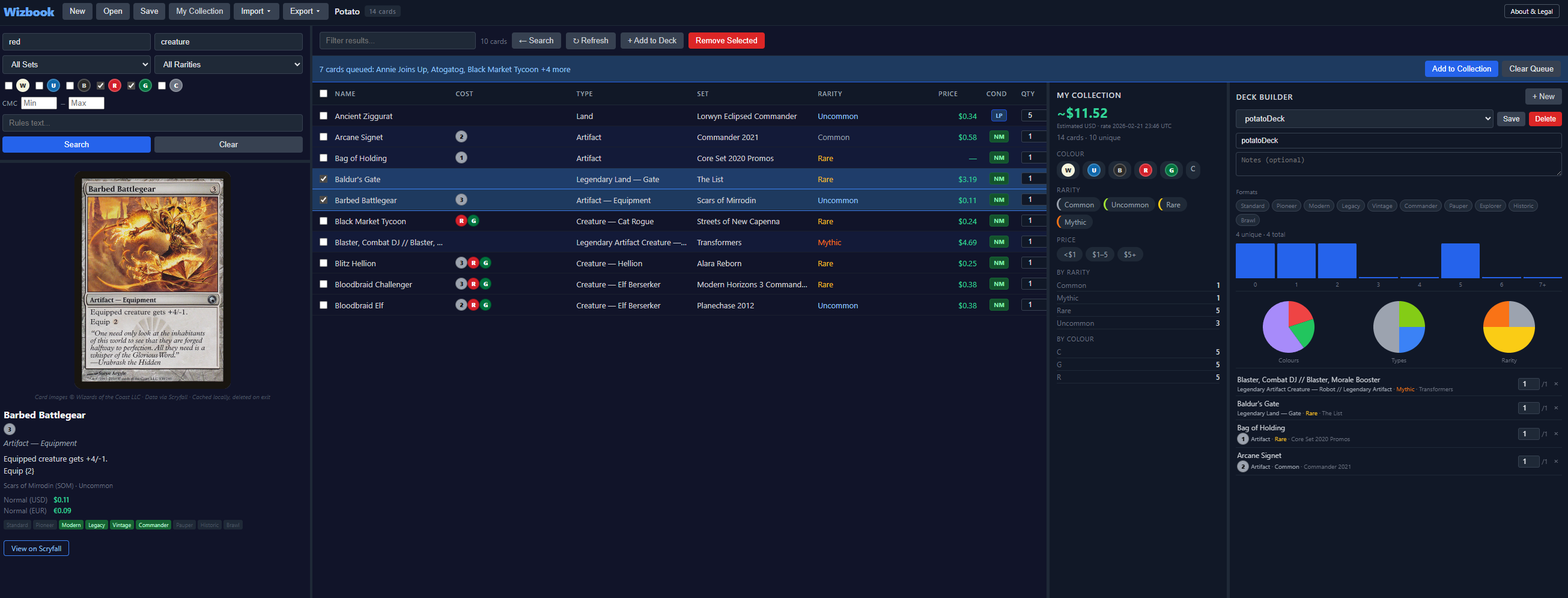
- Add cards. Search and add cards with one click
- Quantities & conditions. NM, LP, MP, HP, DMG per entry
- Finish tracking. Regular, Foil, Etched, plus premium treatments: Surge Foil, Gilded Foil, Textured Foil, Oil Slick, Rainbow Foil, Galaxy Foil, and frame variants (Extended Art, Borderless, Showcase, Retro). The finish picker shows only what each specific printing was actually released in.
- Auto-correct finishes. When you open a collection, any entry whose finish is impossible for the printing (e.g. "Regular" on a foil-only Secret Lair) is silently re-tagged to a valid finish
- Total value. Real-time market pricing from Scryfall
- Price history charts. Weekly history with normal and foil prices
- Filtered stats. Apply advanced filters and see filtered value, counts, and rarity breakdown
- Set completion. Track ownership percentage for every set
- Undo & redo. Every change can be undone (Ctrl+Z) or redone (Ctrl+Y)
Card Tags
Add custom colour-coded tags to any card. Useful for trade lists, or for any grouping that matters to you and to nobody else.
- Per-card tags. Up to 5 tags per card, 20 characters each, with a colour of your choice
- Tag palette. Reusable tags saved with your collection for one-click application
- Compact display. Single tags show full text; multiple tags show as coloured initials
- Tag filtering. Filter your collection by tags in Advanced Filters
Bulk Actions
Select multiple cards and apply changes to all of them in one click.
- Set Finish. Change all selected cards to any finish type
- Set Condition. Change all selected cards to NM, LP, MP, HP, or DMG
- Set Note. Apply the same note to all selected cards
- Bulk Tag. Apply a tag to all selected cards at once
- Undo support. All bulk actions can be undone
Import & Export
Bring your cards in from other tools or export your collection to use elsewhere.
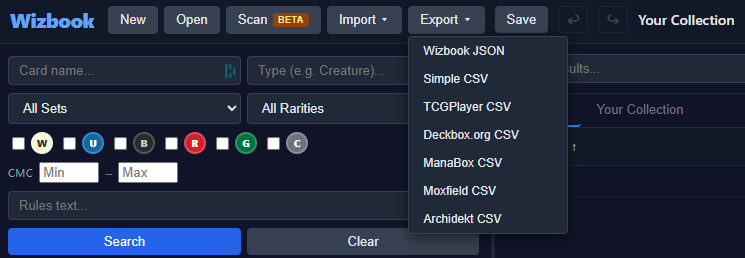
- Wizbook JSON. Native format with full fidelity (decks, binders, tags, wishlists)
- CSV auto-detect. Import any CSV and Wizbook maps columns automatically
- TCGPlayer, Deckbox, ManaBox, Moxfield, Archidekt. Import and export
- Cockatrice .cod. Import and export decks
- Import dialog. Choose to merge into current collection or create a new one
Deck Builder
Create and manage multiple decks drawn from your collection, with Commander support and type-grouped card lists.
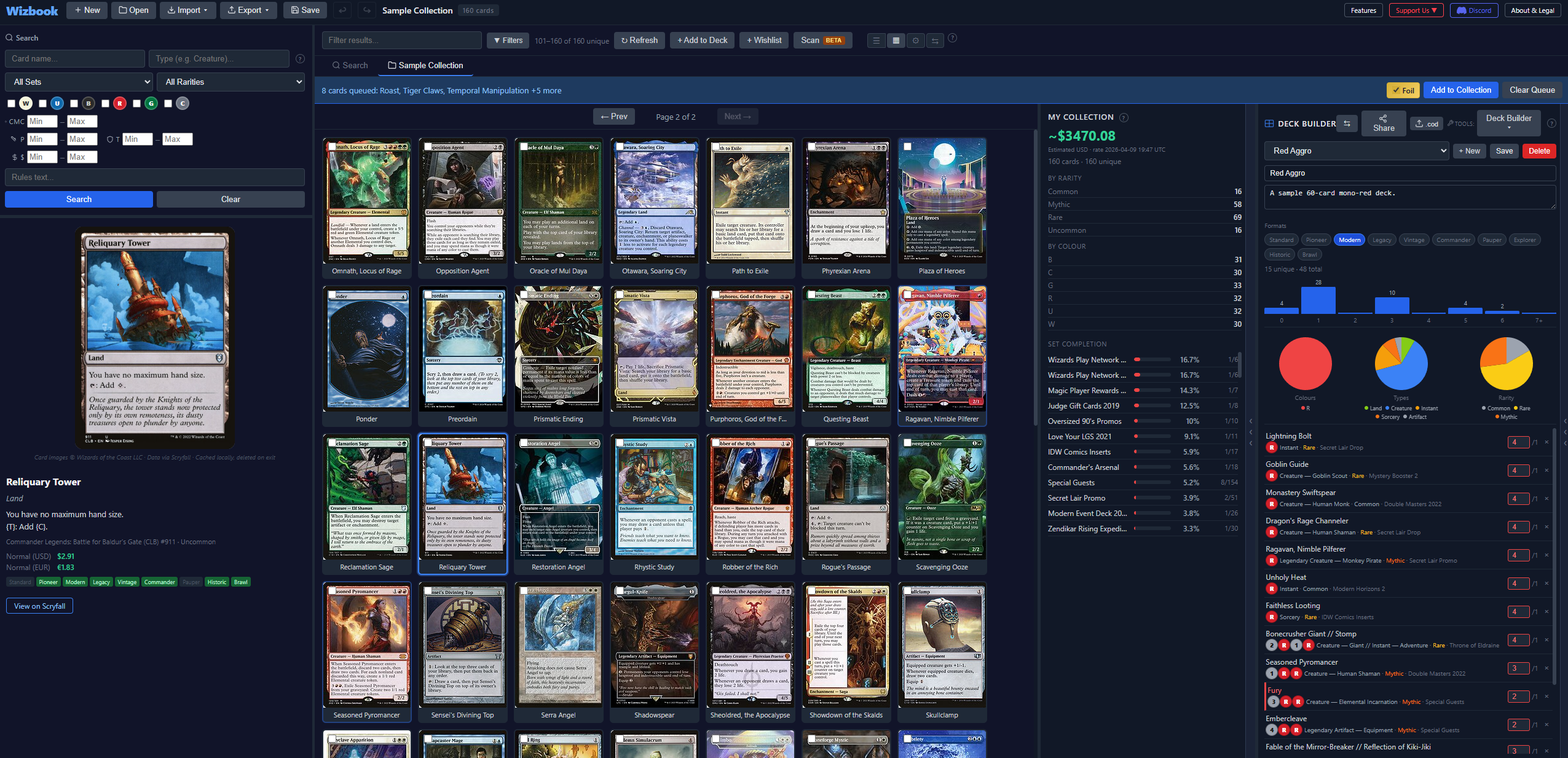
- Create decks. Name your deck, add notes, and tag with format labels
- Commander support. Set a commander for Commander-format decks with a search-based card picker
- Wish Decks. Toggle the star to build decks with cards you don't own; missing cards show “Need” badges and can be sent to a wishlist in one click
- Card hover preview. Hover over any card row in list view to see a floating image preview (toggleable)
- Type-grouped card list. Cards grouped by Creature, Instant, Sorcery, etc. with collapsible headers, card counts, and price subtotals per group
- Deck value. Total deck price at the top, per-card prices on each row
- Deck analytics. Mana curve chart, colour distribution, type breakdown, rarity pie charts
- Deck sharing. Generate a shareable link with rich viewer (no account needed)
- Cockatrice export. Export any deck as a .cod file
- Multiple decks. Create as many as you want, all saved with your collection
Deck Simulator
Run probability simulations and draw sample hands from any saved deck.
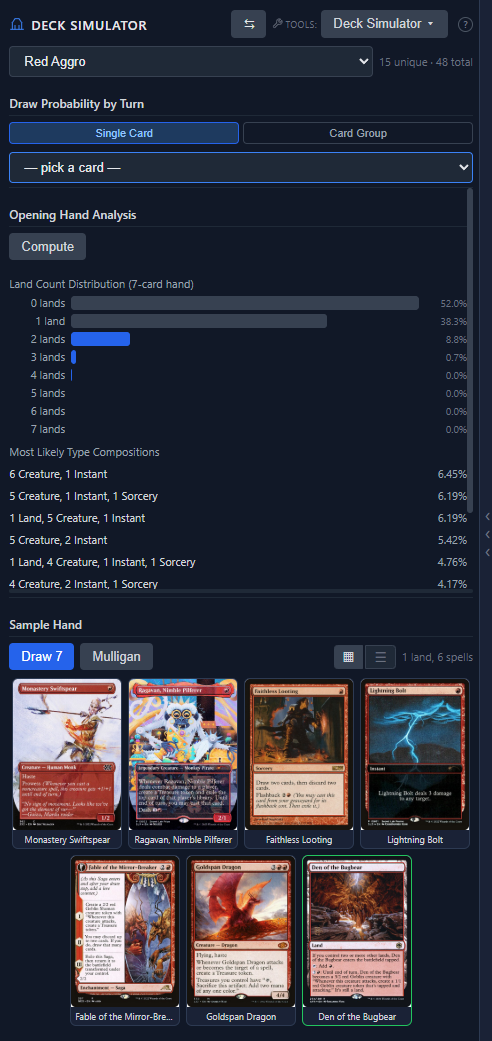
- Draw probability. Chance of drawing a specific card by each turn
- Opening hand analysis. Land distribution and type composition probabilities
- Sample hand. Draw random 7-card hands in grid or list view, with mulligan
- Click to view. Click any card in a sample hand to see full details
- Resizable sections. Drag the handle between analysis and sample hand
Card Synergy
Discover cards that synergise with your deck or a custom card list, with granular filters to narrow down exactly what you need.
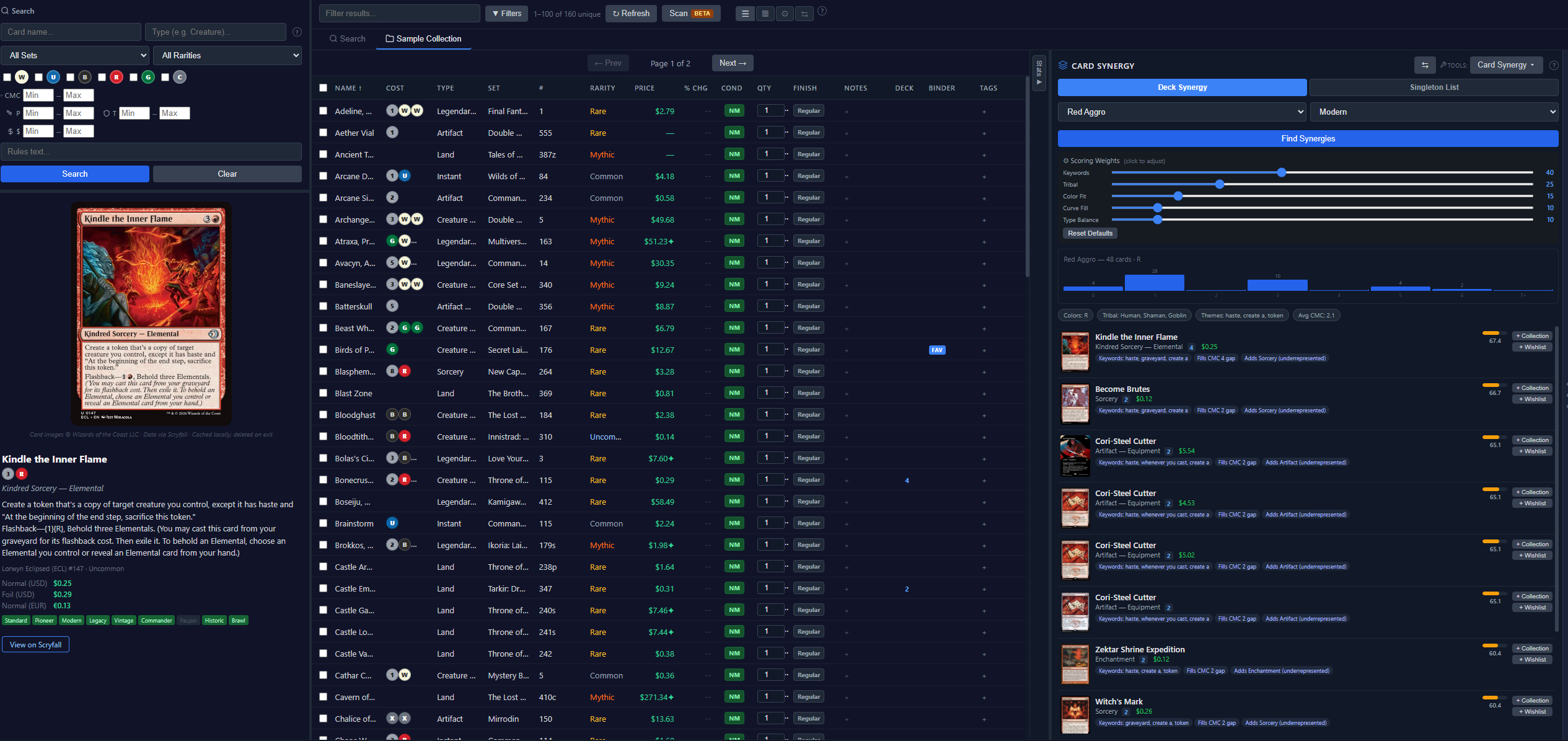
- Deck Synergy mode. Select a deck and find complementary cards
- Singleton List mode. Build a quick ad-hoc list and search for synergies
- Smart scoring. Keyword overlap, tribal match, colour fit, curve fill, type balance
- Adjustable weights. Tune scoring priorities with sliders; re-run to see changes
- Card Filters. Narrow results by card type (Creature, Instant, etc.), supertype (Legendary, Snow), rarity, CMC range, and power/toughness range
- Format filtering. Standard, Modern, Pioneer, Legacy, Vintage, Commander, Pauper
- Mini mana curve. See your deck's curve with hover highlighting for each result
- Synergy reasons. Each result shows why it was suggested
- Add to wishlist. Pick which wishlist or create a new one directly from results
Deck Discoverer
Pick a format and find out what decks you can build from your collection, ranked by how close you are to completing each one.
- Collection matching. Compares real deck lists against your collection and shows a buildability percentage with a colour-coded progress bar
- Competitive decks. Tournament-winning lists from Spicerack (Standard, Modern, Pioneer, Legacy, etc.)
- Precon & casual decks. Official Commander decks, event decks, starter decks, and more from MTGJSON
- Import a deck link. Paste a public Archidekt URL and Wizbook fetches the deck + matches it against your collection
- Paste a deck list. Drop any plaintext list (Moxfield export, MTGGoldfish, TappedOut, Arena export, or a generic
4 Card Namelist) to get the same analysis - Filters. Narrow results by colour identity, card text (e.g. “trample”), deck name, and minimum buildability
- Commander display. Commander decks show who leads them right on the result card
- Expanded detail. Click any deck to see the full card list grouped by type, with mana curve, per-card stats (cost, power, rarity, set, price), and hover preview
- Missing card analysis. Cards you don't own are highlighted with “Need” badges and estimated cost to complete
- Smart deck creation. One click creates the deck; automatically uses Wish Deck mode if you're missing cards
- Send missing to wishlist. Send all cards you don't own to a wishlist with the right quantities for purchase research
Cube Checker
Import a CubeCobra cube list (by URL or paste) and see exactly which cards you already own.
- CubeCobra URL import. Paste any CubeCobra cube link and Wizbook fetches the list automatically
- Paste a list. Drop any plaintext cube list (one card per line) for instant analysis
- Ownership summary. See at a glance how many of the cube’s cards you own and what percentage that is
- Missing cost estimate. Total estimated price to fill the gaps based on current market prices
- Grouped card list. Cards organised by type (Creature, Instant, Sorcery, Land…) with owned/missing indicators
- Filter view. Toggle between All cards, Owned only, or Missing only
- Send missing to wishlist. Add all missing cube cards to a wishlist for purchase planning
Binder Manager
Organise your favourite cards into visual binder pages.
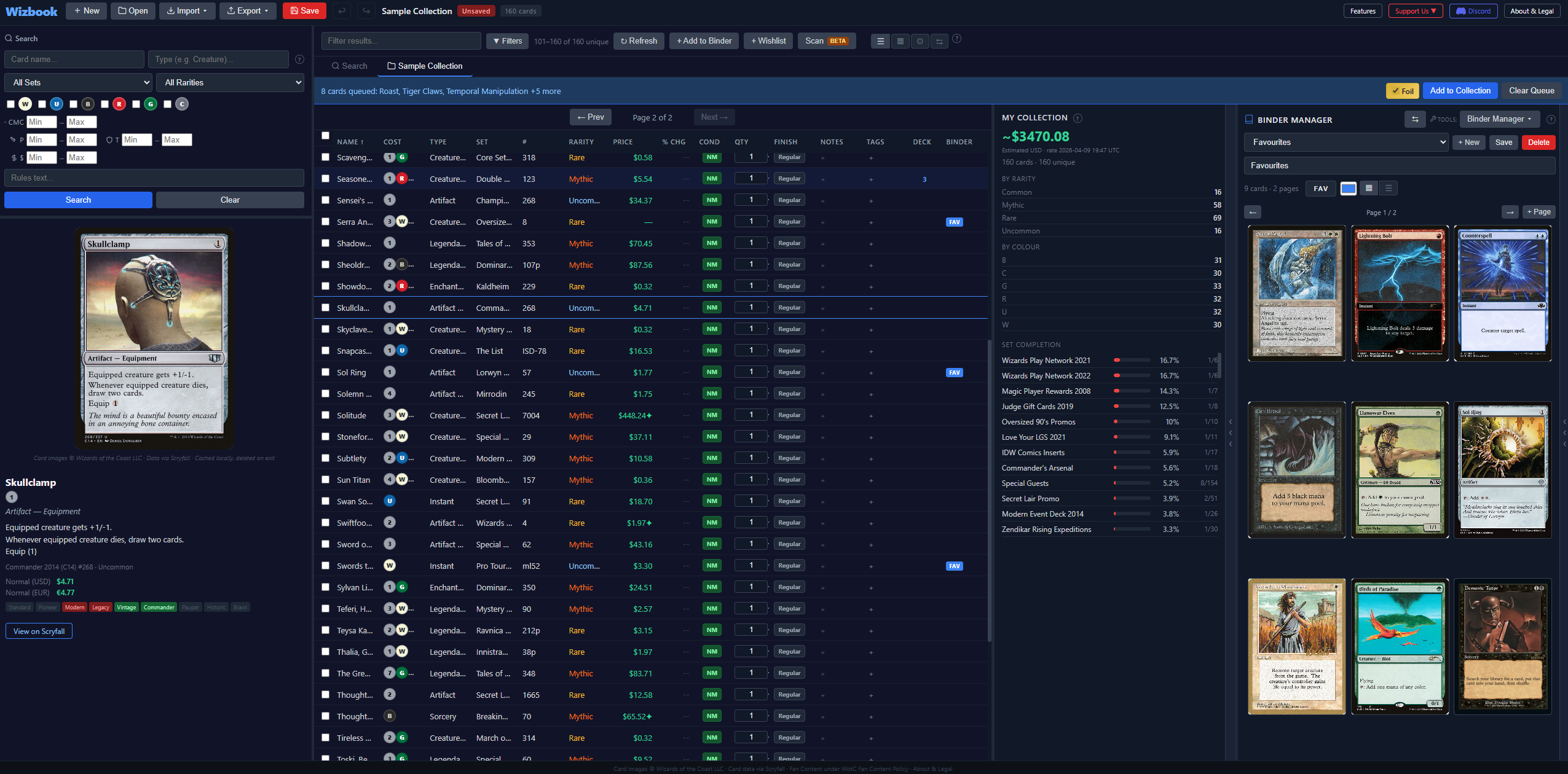
- Page sizes. 3×3, 4×3, or 4×4 grid layouts
- Drag & drop. Rearrange cards within a page; on mobile, tap the move button then tap the destination
- Binder tags. Coloured tag badges visible in the collection table
- Multiple pages & binders. Navigate, add pages, manage as many as you need
Rapid Card Adder
The fastest way to add cards when you know what you're looking for.
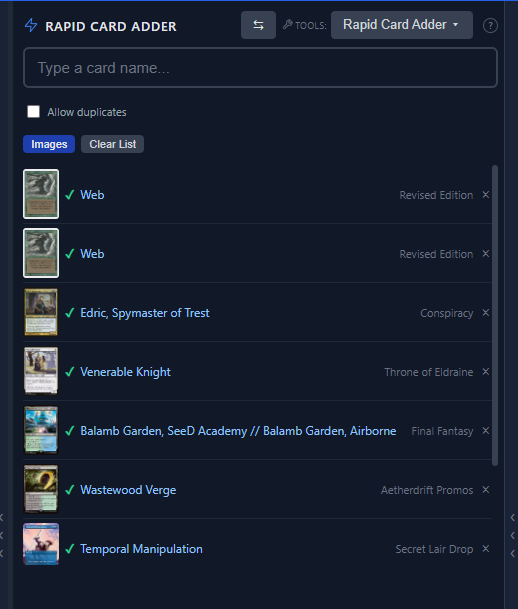
- Type-ahead suggestions. Start typing and see matching cards instantly
- Fuzzy matching. Handles typos and spelling mistakes
- Set-specific results. Pick the right printing from the right set
- Keyboard-driven. Arrow keys + Enter to select without the mouse
Card Buyer/Seller
What you paid, what you sold it for, and what has moved since. A collection is worth something; this is where you find out whether it made you anything.
- One log for buying and selling. Every purchase and sale in one place, with the date, the price, how many, and where it came from
- Cost worked out for you. A card bought more than once counts at the average of those purchases, so selling part of a stack banks part of the gain
- Split a pack, precon or bulk lot. Enter one total and it divides across the cards, weighted by what each is worth or split evenly. The parts always add up to exactly what you paid
- Paid and ROI columns. Sit alongside Price in the card table, sortable like everything else. A card with no purchase recorded shows a dash, never a zero
- Selling removes the cards. The sale is recorded and the cards leave your collection in one step, so the collection stays true. Undo puts both back
- Highest Movers, two ways. What has risen on your own shelf, so you know what is worth selling; and what has moved across the whole card database, so you know what is worth picking up
- Honest about what it knows. Figures cover only the cards with a purchase recorded, and the page says how many that is. A movers board built on three weeks of prices says so rather than calling it a year
Set Analyzer
Track your progress across every MTG set ever printed, and add missing cards to wishlists with one click.
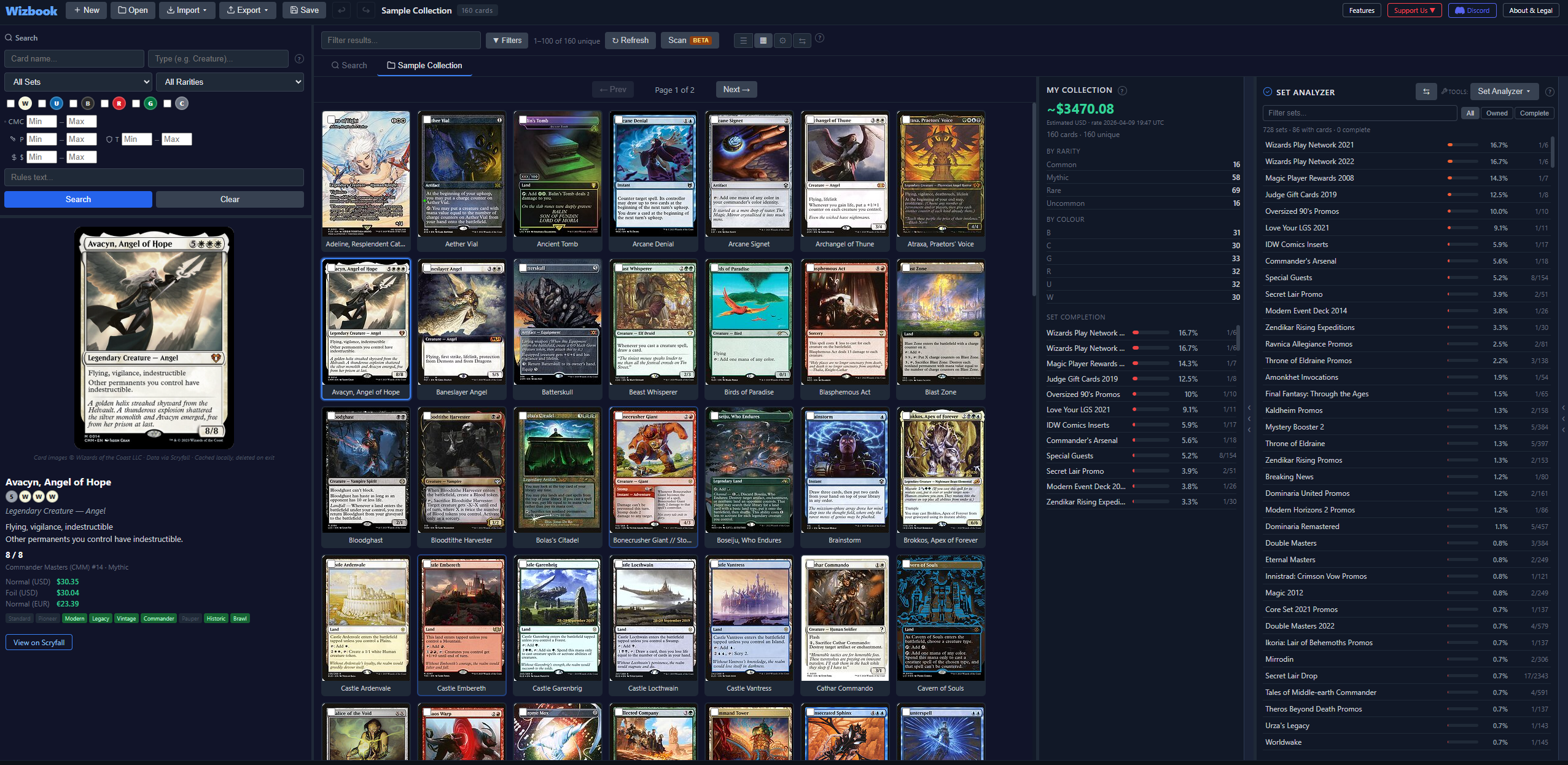
- All sets ranked. Sorted by your completion percentage with colour-coded bars
- Set detail view. Every card marked as owned or missing
- Missing card charts. Rarity, colour, and type pie charts
- Add to wishlist. Per-card button, multi-select checkboxes, Select All, or bulk add all visible missing cards to any wishlist
- Add to collection. Per-card “+Coll” button and a bulk “+ Collection” action for cards you already physically own but haven't recorded, or just bought
- Double-click to select. Quickly toggle individual card selection
- Wishlist picker. Choose an existing wishlist or create a new one from the modal
- Card viewer integration. Click any card to see full details
Wishlists & Buy from Retailer
Track cards you want to acquire with estimated purchase costs, then jump straight to your favourite retailer to actually buy them.
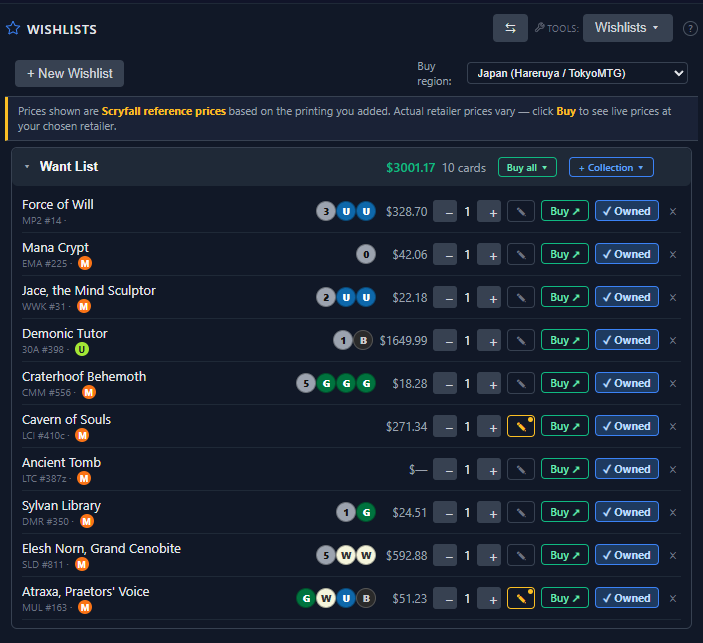
- Multiple wishlists. Create, rename, and delete as many as you need
- Type-grouped cards. Cards organised by Creature, Instant, Sorcery, etc. with collapsible headers showing card count and subtotal price per group
- Collapse controls. Per-wishlist toggle to collapse/expand all type groups, plus a top-level “Collapse All” button for all wishlists
- Printing details. Each row shows the set, collector number, and rarity dot so you always know which printing you're tracking
- Estimated cost. Per-card, per-type-group, and per-wishlist totals using Scryfall reference prices
- Add from search. Desktop picker or mobile long-press
- Add from Set Analyzer. Select missing cards and add them to any wishlist directly
- Auto-create. Adding a card with no wishlists creates a default one
Buy from Retailer
Wishlists and the card viewer integrate with major MTG retailers worldwide. Pick your region once and Wizbook remembers it across the app.
- Per-card Buy buttons. Every wishlist row has a green “Buy ↑” button that opens the search at your region's retailer in a new tab
- Buy all bulk action. Per wishlist; copies a complete deck list to your clipboard and opens TCGPlayer mass entry (or copies to clipboard for retailers without mass entry)
- Region selector. Pick your buy region from the wishlist toolbar or the card viewer popover; selection syncs everywhere
- 6 retailers across 5 regions. TCGPlayer (US), Cardmarket (EU), Magic Madhouse (UK), MTGMate (AU), Hareruya & TokyoMTG (JP)
- Card viewer integration. The same Buy popover appears next to “View on Scryfall” for any card, not just wishlist entries
- Honest pricing. Wizbook uses Scryfall as a reference price and is transparent about it. No scraping, no tracking, no affiliate links
Built for a Phone
Every screen was redesigned for a small display rather than shrunk to fit one. Nothing here changes the desktop app.
- Five tabs. Collection, Search, Add, Decks and More, with the tools behind More
- Bottom sheets. Dialogs rise from the bottom of the screen where your thumb is, and swipe away
- Deck Builder in one screen. A collapsible header, a stepper on every row, swipe to remove, and an Add bar fixed to the bottom
- One Add screen. Camera and typing feed the same queue, with the destination named on screen
- Search searches everything. The whole card database every time, flagging what you own and how many
- Tools that fit. Set Analyzer and Cube Checker as a completion ring and a grid, the Deck Discoverer as a ranked list, Card Synergy explaining every match, binders a page at a time
- Imports you can see first. Matched, copies and skipped counts before anything is added
- A sample hand that fans out. And a one button mulligan
- Add to your home screen. Wizbook installs with its own icon and opens without an address bar
One guide per tool
This page is what each tool does. The guides are how to use them, with the parts that are easy to miss.
- Importing and exporting your collection Bring your collection in from ManaBox, TCGPlayer, Deckbox, Moxfield or Archidekt, and take it out again whenever you like.
- Scanning cards with your phone Point a camera at a card and it lands in your collection. What the scanner is good at, and what to do when it guesses wrong.
- Building a deck from cards you own Start from your shelf rather than from every card ever printed, and plan the gap when you stray off it.
- Laying out a binder Mirror the binder on your shelf, page size and all, and find the cards you have not filed yet.
- Finishing a set Find the set you are unexpectedly close to completing, and turn what is missing into something you can buy.
- Keeping a wishlist and buying from it Track what you still want, see what the list would cost, and get through to a shop that will post to you.
- Tracking what you paid and what you sold Log purchases and sales, split a precon across its cards, and find out whether the collection has made you anything.
- Using Wizbook Cloud, or not What an account gets you, what the limits are, and why you never need one to use Wizbook at all.
- Finding decks you could already build Real decks scored against your shelf, grouped so five copies of one deck are one result, and filtered by what you can afford.
- Testing a deck before you sleeve it How often the deck draws the thing it is built around, and whether it is running enough lands.
- Finding cards that fit a deck Cards you already own that suit what you are building, and how to tune what fitting means.
- Checking a cube against your collection Paste a cube list or a CubeCobra link and see how much of it you own, and what the rest would cost.